Welcome to Timepage 5
Timepage 5 has been a long time cooking, but it’s finally here! It introduces Week View, which is the feature you’ve asked for the most. Getting it right meant thinking carefully about how to make Timepage do more without getting cluttered. We read every email and review, and talked to many of you as we developed it.
Alongside Week View, this update brings a refreshed Day View, Month View on iPhone, smarter event entry, new Customisation options, and a big ol’ list of cool little things. We can’t wait to see what you think!
Week View, finally
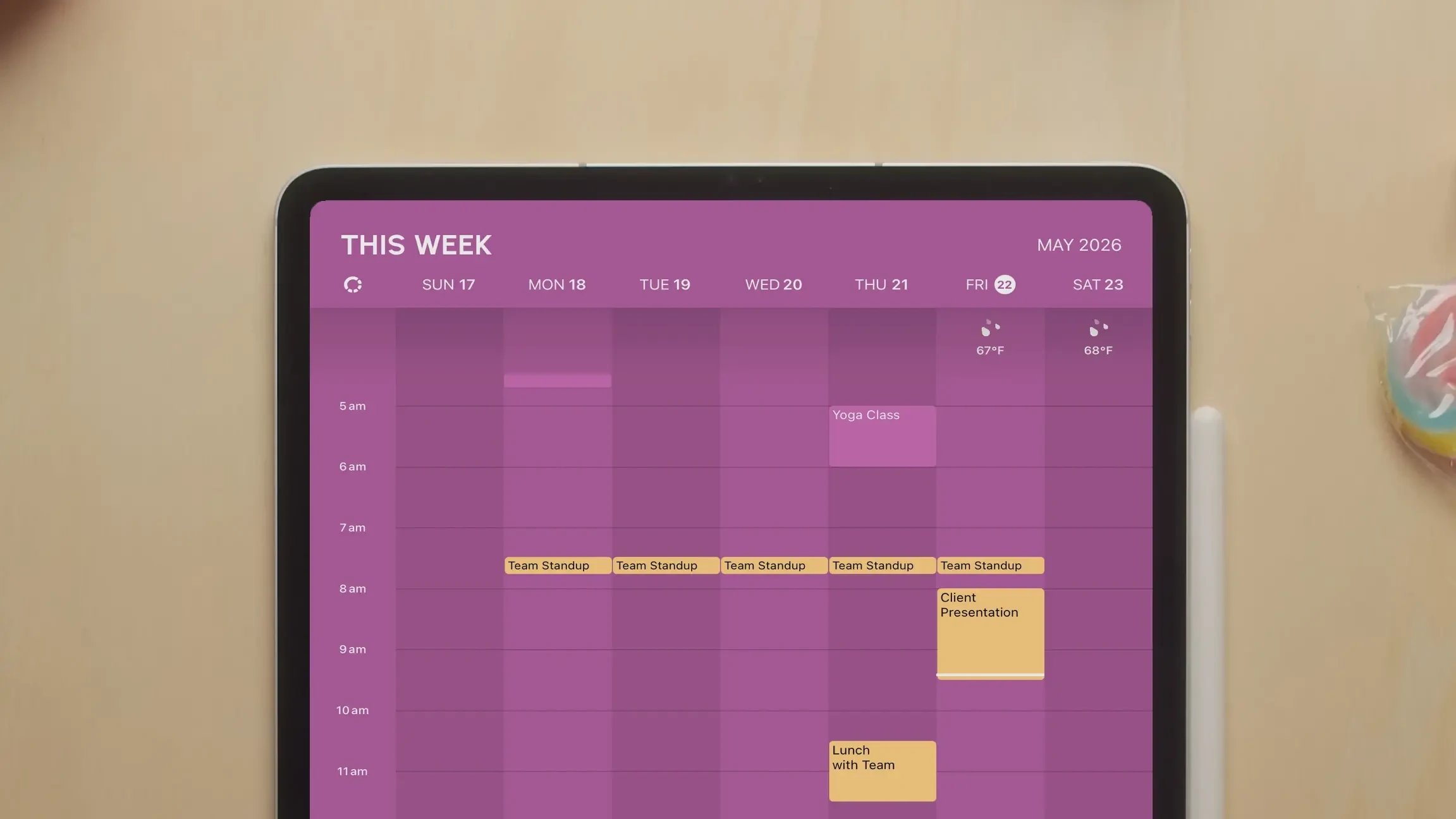
Week View is the feature we’ve been asked for more than any other. For years, our reply has been some version of: we want to do it, but we want to do it the Timepage way. A grid you’d see on any other calendar app was never going to be enough. The trick was making the week feel scannable without losing the calm, considered surface that’s the whole point of using Timepage.
What shipped is, we think, the version worth waiting for. There are two layouts. Hourly lets you see free and busy time across the whole week, with the option to show all 24 hours or just your preferred morning-to-evening range. If something sits outside that range, the view widens to keep it visible. Grid is a calmer overview that summarises each day with the day’s headline events. Tap anywhere to drop in a new event, drag to set its length, tap again to confirm. Hold and drag to move an existing event. It’s the same direct event-handling vocabulary that’s in Day View, applied to a wider canvas.
The new Week Widget brings the same design out onto the home screen. Configure it to show the full week or just the next few days, depending on how much room you want it to take up.
Day View, refined
Day View is still the heart of Timepage, and it gets some focused attention in this release. The layout switcher between Hourly and Card has moved out of a button at the bottom of the screen and up into the Schedule heading, which makes it feel like part of the view rather than a separate control. Hourly mode now has size controls and the same morning-to-evening toggle as Week View, so the two views feel coherent. All-day events can be shown in a grid layout to save vertical space, and weather can be expanded or contracted to taste.
Month View, on iPhone
Month View on iPad has been a Timepage favourite for years. With Timepage 5 it now works the same way on iPhone. Swipe over from the heatmap to see it, or rotate your iPhone the way you always could. Pinch to change the size of days. New Preferences let you choose how events are displayed and which screen colours are used.
Smaller things that add up
A new icon screen for app icons, with all 70 colours available across multiple styles. The Themes screen is now Customisation, with new heading fonts and colours including Volcanic Black and Neon. Smart Alerts is now Notifications, with a whole new, more modern Daily Briefing design. Year View has been rebuilt as a swipeable overlay that slides up from wherever you tap a year. Search now pops up over whatever screen you’re on. Calendars in the main menu takes you straight to your connected calendars. “Today” now sits correctly below the Dynamic Island on iPhone. The return-to-today button floats across the timeline, heatmap, and Month View screens. The heatmap fits more content on screen. And we’ve put performance work into faster loading and smoother scrolling throughout.
Thank you
We’re a small team. Every release of Timepage is a labour of attention from a few people who care a lot about what calendars can be when they’re treated like considered, well-made tools. Week View is the kind of feature that gets requested every week and discussed for years. Shipping it feels good. We hope the version we landed on is one that fits the way you actually use the app.
If you want to chat, you can always reach us directly at timepage@bonobolabs.com.
– The Bonobo Team